Independent iOS Product · 2021 – present
Flashcard Dictionary
Every lookup becomes a flashcard: look a word up, tap the star, and it is yours to review. Answer one question each time — remembered or not — and familiarity builds over time. A subscription English-learning iOS app I designed, built, launched and still run on my own.
Try it yourself
An interactive re-creation of the app on the project’s main branch: look a word up, star it, then review it under Favorites and watch its familiarity change.
This interactive prototype needs JavaScript. The demo video below shows the same flow in the real app.
- Role
- Product designer & developer
- Platform
 iOS · App Store (U.S. and China)
- Timeline
- 2021 – present
- Stack
- Swift · UIKit · Core Data · StoreKit subscriptions · Oxford Languages dictionary API
Outcomes
Context
01 / 05You looked the word up. Then what?
For non-native learners, the old ways of building vocabulary are slow and dull: rote memorization, stacks of static cards, and no way to see how much has actually stuck.
Surveys and interviews with English learners at different levels kept surfacing the same gap: after a lookup, there is no next step. A dictionary ends at the definition; vocabulary apps have a review rhythm, but the word list is someone else’s and rarely matches the words you actually meet.
That made the goal concrete: put remembering inside the act of looking up. A word you look up becomes a card with one tap, reviewing asks a single question, and progress is visible.
- Finding 01Words don’t stick
Learners forget words they studied days ago, even after repeated exposure.
- Finding 02Traditional flashcards feel monotonous
Repetitive, non-adaptive drilling makes people stop opening the app.
- Finding 03People want to see progress
Most wanted to measure improvement, not guess at it.
- Finding 04Short sessions win
Learners prefer bite-sized study that fits into a day, not a block of time.
Research
02 / 05Two learners
From the interviews and surveys I drew two personas: one building vocabulary for an exam, one for work. Neither wanted to drill someone else’s word list again.
-
Persona 01
Yang Kaihan · 22 · college student preparing for the GRE
Pain pointsStruggles to remember new words despite frequent exposure; finds existing apps either too simplistic or too cluttered with distractions; needs a structured way to track progress.
GoalsExpand GRE vocabulary efficiently; retain words through a structured, adaptive method; use a distraction-free mobile tool that fits a daily study routine.
-
Persona 02
Alejandro Torres · 30 · product marketing manager in Seattle
Pain pointsAs a non-native speaker, struggles with nuanced vocabulary in business communication; existing apps feel too academic for his career; has no hours to spend studying.
GoalsImprove the vocabulary of his professional communication; learn words that apply directly to marketing and business contexts; a structured tool that fits a busy schedule.
Each existing app was missing a piece
I compared Anki, Quizlet, Duolingo, Merriam-Webster and Baicizhan. General flashcard tools make you build every card yourself; vocabulary apps have a review rhythm but fix the word list for you; dictionary apps find the word but do nothing to help you keep it. None put lookup, card creation, adaptive review and progress on one path.
Flashcard Dictionary is that path: dynamically generated flashcards, a memorization algorithm that adapts over time, and a familiarity score for every word. Three principles followed from it and shaped every screen.
- Principle 01A looked-up word becomes a card with one tap: no second app, no card-making.
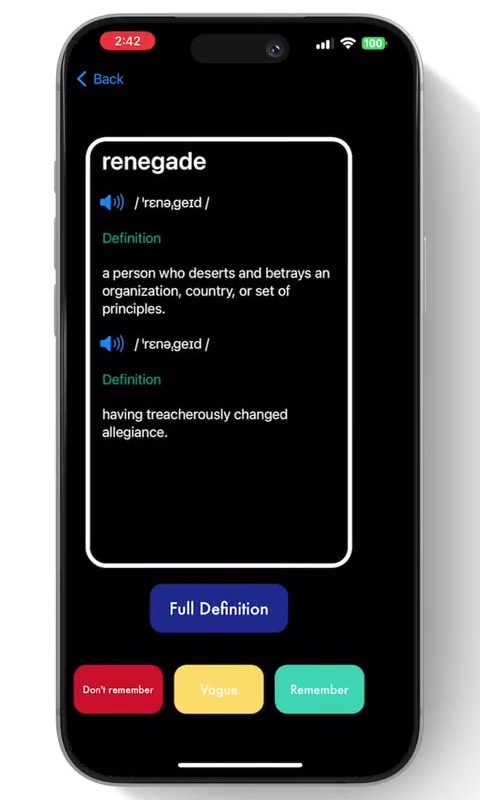
- Principle 02Reviewing asks one question — do you remember? — with three answers.
- Principle 03Progress is visible: each word has a familiarity score, shown as a number and a color.
Solution
03 / 05The final design: one loop
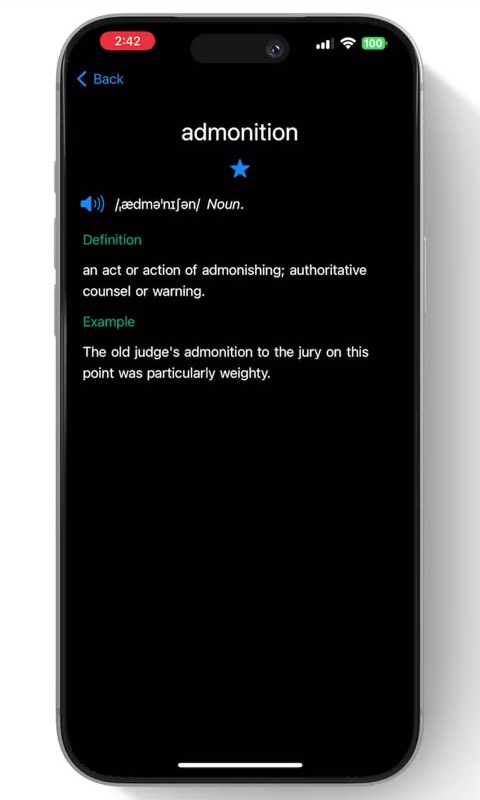
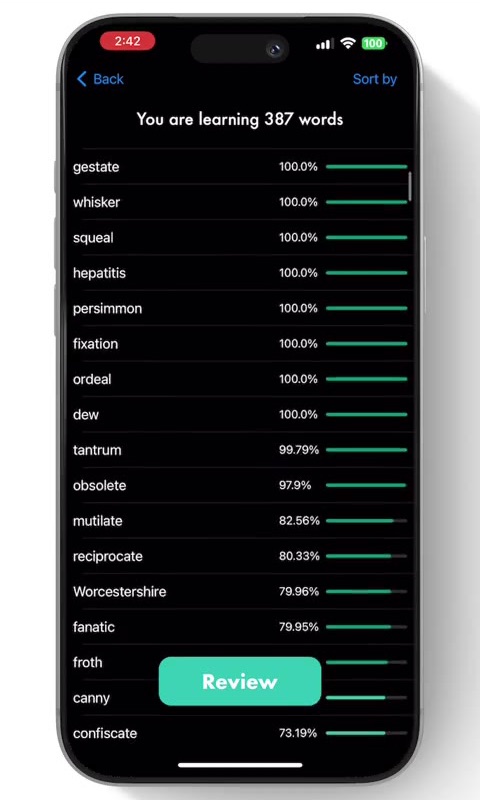
Look up, save, review, see progress — four steps in one app. The home screen is a single search field; Saved Words is a list with a progress bar per word; review is a stack of cards you swipe through.
- 01Look up
Type or tap any word to read its definition and examples and hear it; every word inside a definition is a lookup too.
- 02Save
Tap the star and the word becomes a flashcard, starting at 0% familiarity.
- 03Review
Flip cards least-familiar first, most-familiar first, newest, oldest or shuffled, and answer one question: do you remember?
- 04See progress
Every saved word has a familiarity bar, colored from red to deep green.
The memorization algorithm: making the interval visible
Every word has a familiarity score from 0 to 100%. Answer Remember and the score rises by the days since the last review divided by 30; answer Don’t remember and it falls by the same amount; Vague leaves the score alone and only restarts the clock.
So answering Remember right after reading a card changes almost nothing; remembering after a week adds 23%; remembering after a month fills the bar. The rule rewards spacing reviews out and keeps the reviews for the words that need them.
The bar’s color follows the score: red below 25%, yellow below 50%, light green below 75%, deep green above. In the prototype above you can move time forward a few days and review again.
The free limit is part of the conversion path
The free plan saves 10 words. Starring the eleventh opens the subscribe screen: monthly or yearly, with restore purchase always available.
The paywall sits at the moment someone wants to keep one more word, not at launch in front of everyone: people first complete the lookup–card–review loop, then hear about subscribing. Subscriptions run on StoreKit, so the entitlement follows the Apple account.
Engineering: fast lookups, offline reviews
Definitions come from the Oxford Languages dictionary API, with parts of speech, examples and pronunciation audio. When a word is saved, the app trims the entry down to what the flashcard needs and stores it in Core Data alongside the word, so reviewing never depends on the network.
Search suggestions come from a bundled word list: after three characters the app matches by prefix and shows up to ten. Dark mode, an offline notice and a fallback for words that are not found were all in the first release.
Iteration
04 / 05After launch
Shipping was not the finish line. Most later releases came from user feedback: make Saved Words easier to work through, make lookups faster, make the cards cleaner — and one feature was tried and taken back out.
- 20211.0 ships
Lookup, saving, flashcards, the three answers and the familiarity algorithm.
- Late 2021Subscriptions
A free limit plus monthly / yearly plans with restore purchase.
- 2022Saved Words
Sort by familiarity, swipe to delete, search suggestions.
- 20235.0
Simpler home screen and cards; an experiment pairing words with movie quotes from GPT, later switched off.
- 2025Tab bar
Home and Saved Words become bottom tabs; dark and light mode fixes.
Results
05 / 05Results
Flashcard Dictionary has passed 50,000 App Store downloads worldwide, rated 5.0/5 in China and 4.3/5 in the U.S.
For a one-person project the bigger result is that it is still alive: four years on the store, still being iterated, still opened every day by people looking words up and flipping cards.
Three things I took with me
None of this is specific to a dictionary. Any product that wants a habit runs into the same questions: where the action lives, whether the rule should be visible, and when to ask for money.
- 01Put remembering inside looking up
People will not open a second app to review; let the most natural action create the card on the way.
- 02Make the algorithm visible
A familiarity score and a bar turn the spacing effect into a number, so people know why they should come back in a few days.
- 03Ask for money after the value
Let people complete the loop first, then talk about subscribing at the moment they want to keep one more word.
If I built it again today
On the product side: AI pronunciation practice and more dictionary sources. On the engineering side: explicit states for the network, storage and subscription checks, with injected dependencies so every step can be tested.